
LILACS Methodology Field:
- Field 08 Electronic Address
Guidelines:
-
Electronic Address: copy and paste the link to avoid typing errors. Include the link to the primary source of the full text.
-
Always test the URL to ensure it is working and that it corresponds to the document being described.
-
If you have trouble accessing the link and the journal does not have its own website, contact the journal editor and notify the LILACS Unit for possible support.
-
Select “Full Text” if the link refers to the article’s content.
-
Text Language: choose the language(s) according to the document.
The most commonly used file types and extensions are PDF or HTML. Therefore, when the subfield is:
-
File Type = “PDF” → File Extension = “PDF”
-
File Type = “STATIC HTML” → File Extension = “HTML”
The other subfields should remain blank.
If there is a full-text version in another language, click the Add Electronic Address button and repeat the process, selecting the language corresponding to the linked full text.
Click “Save.”
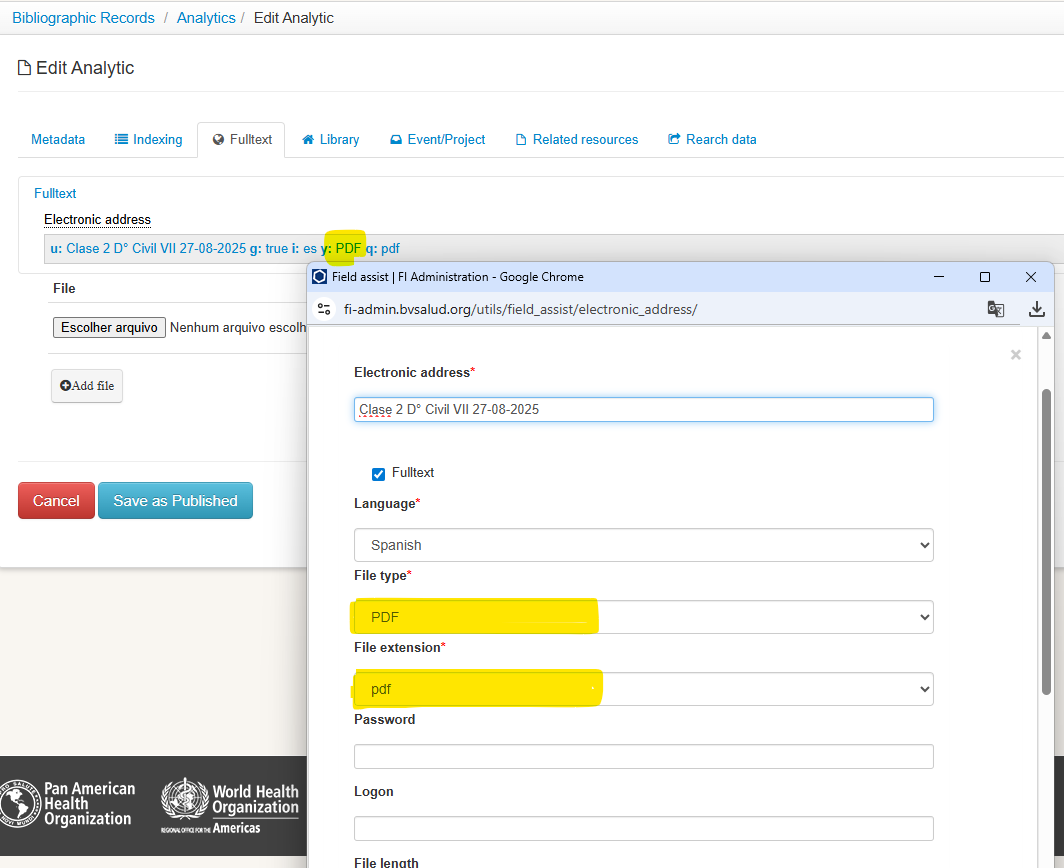
Check that all attributes have been filled in correctly — especially the document language.